As part of your analysis, you discover that an incident is a false positive. You change the incident status to Closed: False Positive. Which statement about your update is true?
Correct Answer:A When an incident in FortiAnalyzer is identified as a false positive and its status is updated to "Closed: False Positive," certain records and logs are updated to reflect this change. Option A - The Audit History Log Will Be Updated: FortiAnalyzer maintains an audit history log that records changes to incidents, including updates to their status. When an incident status is marked as "Closed: False Positive," this action is logged in the audit history to ensure traceability of changes. This log provides accountability and a record of how incidents have been handled over time. Conclusion:Correct. Option B - The Corresponding Event Will Be Marked as Mitigated: Changing an incident to "Closed: False Positive" does not affect the status of the original event itself. Marking an incident as a false positive signifies that it does not represent a real threat, but it does not imply that the event has been mitigated. Conclusion:Incorrect. Option C - The Incident Will Be Deleted: Marking an incident as "Closed: False Positive" does not delete the incident from FortiAnalyzer. Instead, it updates the status to reflect that it is not a real threat, allowing for historical analysis or by a different administrative action. Conclusion:Incorrect. Option D - The Incident Number Will Be Changed: The incident number is a unique identifier and does not change when thestatus of the incident is updated. This identifier remains constant throughout the incident's lifecycle for tracking and reference purposes. Conclusion:Incorrect. Conclusion: Correct Answer A. The audit history log will be updated. This is the most accurate answer, as the update to "Closed: False Positive" is recorded in FortiAnalyzer's audit history log for accountability and tracking purposes. References: FortiAnalyzer 7.4.1 documentation on incident management and audit history logging.
Question 12
Which two statements about playbook execution are true? (Choose two)
Correct Answer:AB
Question 13
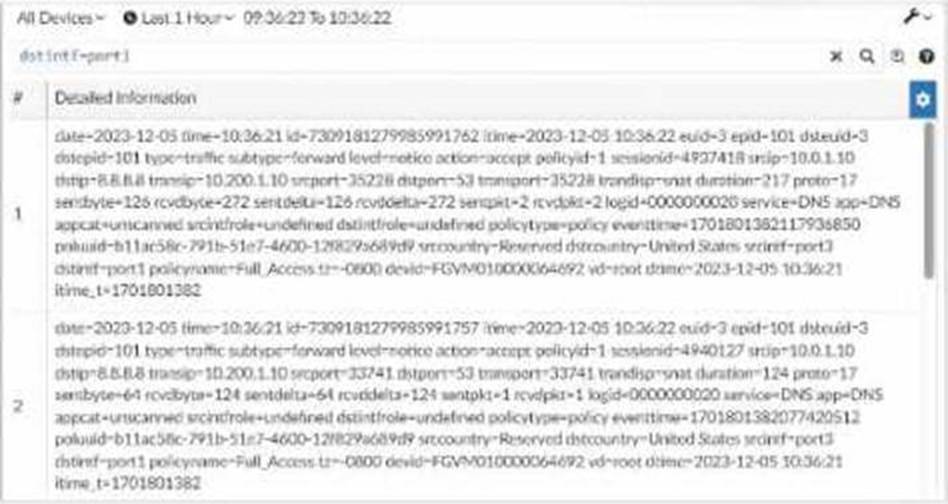
Exhibit. What can you conclude about these search results? (Choose two.)
Correct Answer:AD
Question 14
What is the purpose of using data selectors when configuring event handlers?
Correct Answer:C
Question 15
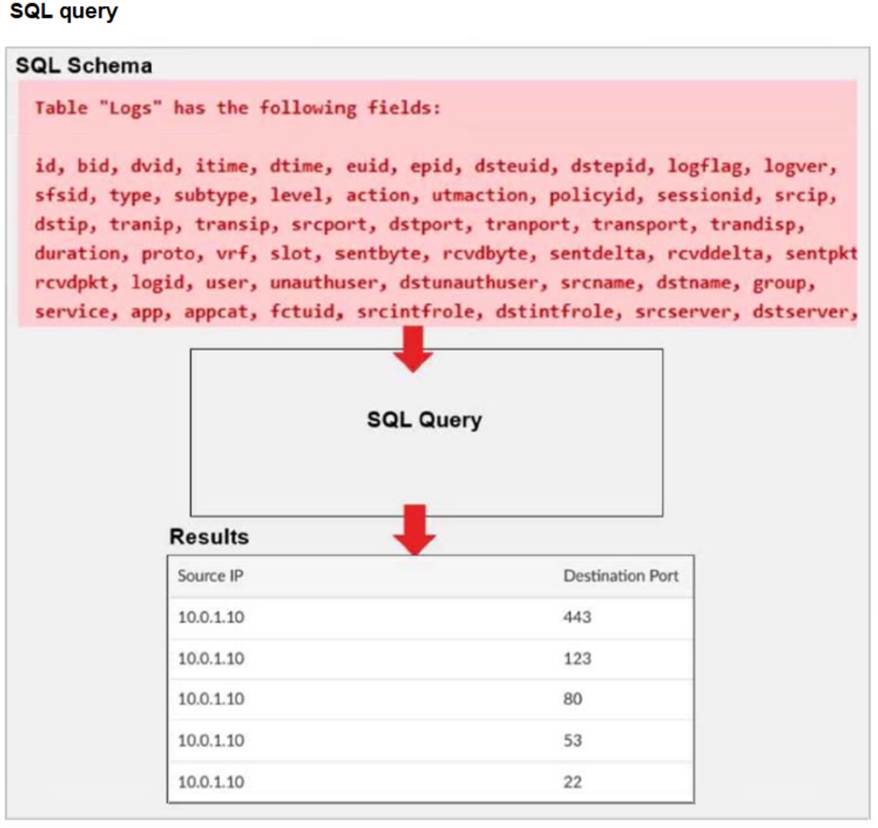
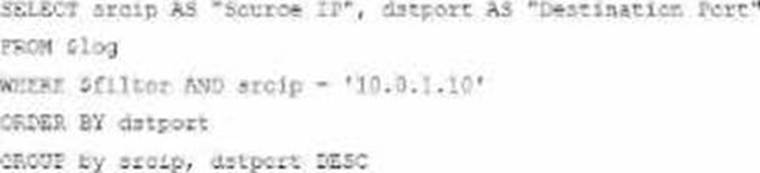
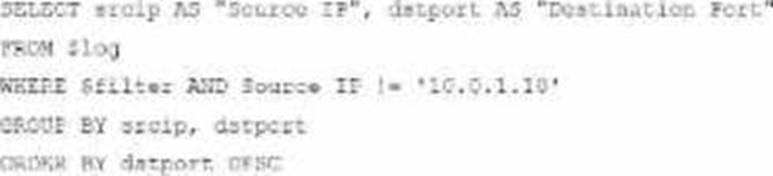
Exhibit. A fortiAnalyzer analyst is customizing a SQL query to use in a report. Which SQL query should the analyst run to get the expected results? A)SELECT srcip AS "Source IP", dstport AS "Destination Port" FROM $log - WHERE $filter AND srcip = '10.0.1.10' GROUP BY srcip, dstport - ORDER BY dstport DESC B)SELECT srcip AS "Source IP", dstport AS "Destination Port" FROM $log - WHERE $filter AND Source IP != '10.0.1.10' GROUP BY srcip, dstport - ORDER BY dstport DESC C)SELECT srcip AS "Source IP", dstport AS "Destination Port" ORDER BY dstport DESC - GROUP BY srcip, dstport - FROM $log - WHERE $filter AND srcip = '10.0.1.10' D)SELECT srcip AS "Source IP", dstport AS "Destination Port" FROM $log - WHERE $filter AND srcip = '10.0.1.10' ORDER BY dstport - GROUP by srcip, dstport DESC
Correct Answer:A The requirement here is to construct a SQL query that retrieves logs with specific fields, namely "Source IP" and "Destination Port," for entries where the source IP address matches 10.0.1.10. The correct syntax is essential forselecting, filtering, ordering, and grouping the results as shown in the expected outcome. Analysis of the Options: Option A Explanation: SELECT srcip AS "Source IP", dstport AS "Destination Port": This syntax selects srcip and dstport, renaming them to "Source IP" and "Destination Port" respectively in the output. FROM $log: Specifies the log table as the data source. WHERE $filter AND srcip = '10.0.1.10': This line filters logs to only include entries with srcip equal to 10.0.1.10. ORDER BY dstportDESC: Orders the results in descending order by dstport. GROUP BY srcip, dstport: Groups results by srcip and dstport, which is valid SQL syntax. This option meets all the requirements to get the expected results accurately. Option B Explanation: WHERE $filter AND Source IP != '10.0.1.10': Uses != instead of =. This would exclude logs from the specified IP 10.0.1.10, which is contrary to the expected result. Option C Explanation: The ORDER BY clause appears before the FROM clause, which is incorrect syntax. SQL requires the FROM clause to follow the SELECT clause directly. Option D Explanation: The GROUP BY clause should follow the FROM clause. However, here, it??s located after WHERE, making it syntactically incorrect. Conclusion: Correct Answer A. Option A This option aligns perfectly with standard SQL syntax and filters correctly for srcip = '10.0.1.10', while ordering and grouping as required. [References:, FortiAnalyzer 7.4.1 SQL query capabilities and syntax for report customization., ]